The load cell in Traeger's flat top grills is the component that measures the weight of the propane tank. It works in conjunction with the tank hook that holds the propane tank and communicates said weight to the fuel sensor in the control panel.
The load cell is located underneath the grill within the load cell housing tube. Part of this housing tube is visible as it holds the tank hook mounting bracket; the other half of the tube is within the control panel housing, accessed by removing the control housing access panel.
This article includes step-by-step instructions for how to replace the load cell on your Traeger Flatrock 3-Zone grill. Includes part numbers, required tools, and estimated completion time.
Applies to:
Part #: Model #: FTK0016 Flatrock 3-Zone
Tools Needed
- Pliers
Estimated Time to Complete
- 20 minutes
Replacement Steps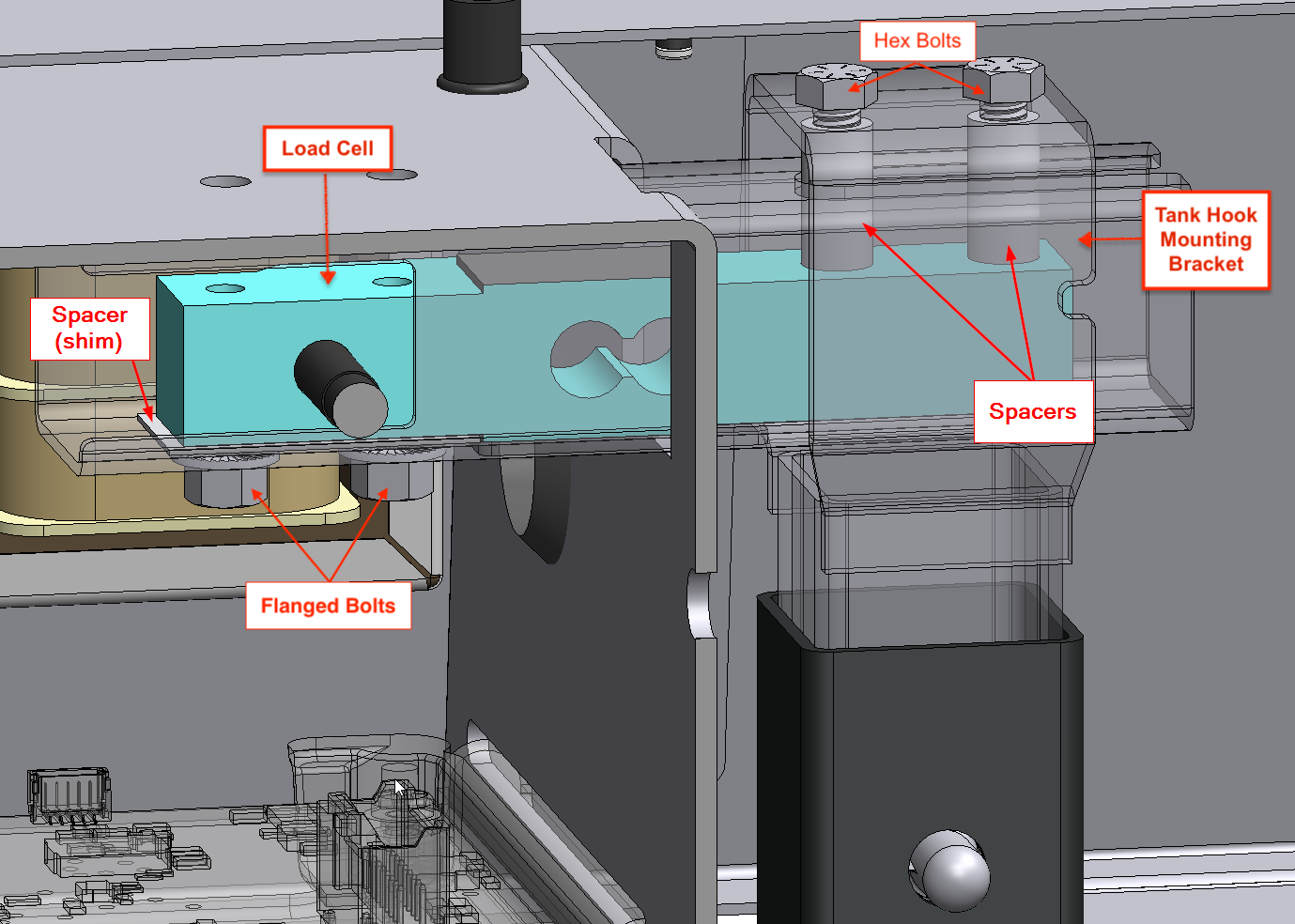
Before Performing Any Replacement Steps:
- Turn burner knobs to OFF position, close the propane tank, and disconnect the regulator
- Unplug the grill from power, and remove the propane tank
- Remove the propane tank hook.
- From underneath grill, find the control housing and remove the two thumb screws holding its access panel in place. Slide the panel toward the front of the grill to remove and gain access to the interior of the control housing.
- Locate the black wire coming from the load cell (next to the propane tank hook and transformer) and follow it to where it connects to the motherboard. Disconnect it from the motherboard by pulling on molex connector.
- Remove the two flanged bolts located within the control housing underneath the load cell housing tube to free the load cell from the housing.
- With the load cell free from the housing tube, grab hold of the tank hook mounting bracket and slide the load cell out of the housing tube.
- Detach the tank hook mounting bracket by removing the two hex screws that secure the tank mounting bracket, the spacers and the load cell together.
-
Remove the shim spacer from the load cell housing.
Install New Load Cell
- Place the new shim spacer into the control housing, aligning the shim's holes with the flanged bolt holes on the bottom of the load cell housing.
- Use the new hex screws to attach the tank mounting bracket to the new load cell and spacers, making sure the load cell is positioned so that the arrow printed on the side points downward when reinstalled. Hand tighten.
- With the hook mounting bracket and load cell secured together, slide the new load cell into the load cell housing the same way you removed it.
Take care to ensure the shim spacer holes stays aligned with the flanged bolt holes. - Attach the new flanged bolts hand tight to secure the load cell and shim spacer into place.
- Connect the new load cell wiring using the Molex connector on the load cell's black wire.
- Reinstall the control housing panel and secure with the two thumb screws.
- Reinstall the tank hook, replace the propane tank and connect the regulator hose.
If you need help replacing your part, or if you run into additional concerns after replacement, contact Traeger Support. We're ready to help 365 days a year.